Designing with Cute Daisy: A Guide to Color Fonts
There is a moment in every design project where a standard typeface just doesn't capture the energy you need. You want something that feels alive, textured, and distinct before you even apply a single layer style. That is the promise of the Cute Daisy typeface. This isn't your typical download; it is an OpenType-SVG color font. This means the color, gradients, and shadows are embedded directly into the font file itself. When you type, you aren't just getting vector outlines; you are rendering a pre-designed, full-color graphic for every single letter.
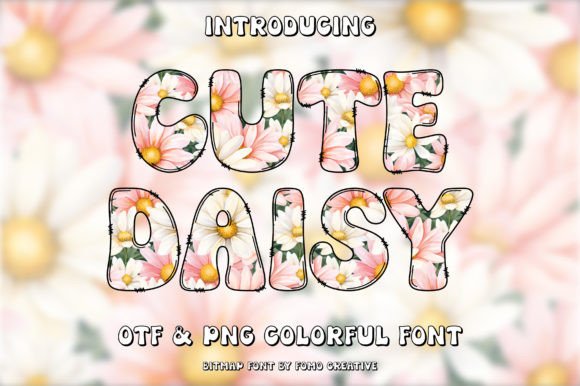
The visual personality of Cute Daisy is playful and organic. It mimics the aesthetic of modern lettering art, where the strokes feel tangible and the color shifts naturally across the character. Because it utilizes the SVG format, the font can achieve a level of realism that traditional flat fonts cannot. You will notice subtle variations in texture and hue that make the text look hand-painted or digitally illustrated. This creates an immediate emotional connection with the viewer, suggesting warmth, creativity, and approachability. It is a prime example of how modern typography is evolving beyond simple lines and into rich visual assets.
Where Cute Daisy Fits in Your Creative Toolkit
Understanding where a display font like this shines is key to using it effectively. Cute Daisy is designed for impact, not for long-form reading. Its strength lies in short bursts of text where personality is the priority. Think of it as the headline act, while your serif font or sans serif font handles the supporting details in the body copy.
In brand identity, this typeface is a strong contender for businesses targeting a youthful, energetic, or artisanal market. It works exceptionally well for:
- Logo Design: For bakeries, florists, children’s clothing brands, or lifestyle bloggers, Cute Daisy offers an instant "vibe" that establishes a friendly tone.
- Packaging Design: If you are designing labels for cosmetics, snacks, or craft supplies, the color gradients in the font can help your product jump off the shelf.
- Social Media Graphics: On platforms like Instagram or Pinterest, visual noise is high. A bold, colorful headline created with Cute Daisy stops the scroll. It adds a layer of polish to stories, quotes, and promotional banners.
- Greeting Cards and Invitations: The aesthetic is perfect for stationery. Whether it is a birthday party invite or a "Thank You" card, the font does the heavy lifting of decoration.
However, context matters. This is a premium font meant for specific applications. You would not use it for a legal contract or a technical manual. Its value is in its ability to inject fun and style into editorial design and digital content where visual appeal drives engagement.
Mastering the Technical Side: SVG Fonts and Compatibility
As a creative professional, you know that a beautiful asset is useless if it doesn't work in your software. This is the most critical technical aspect of working with Cute Daisy. It is an OpenType-SVG color font. This technology allows for the embedded color data, but it does require specific software support.
Based on the specifications, you can confidently use Cute Daisy in Adobe Photoshop, Adobe Illustrator, Silhouette, and Inkscape. These programs support the complex rendering required to display the colors and gradients within the characters.
A crucial note on cutting machines: If you are a crafter or small business owner using a Cricut machine, be aware that the standard OTF or TTF files included with this product are not compatible with Cricut Design Space. Cricut software generally struggles with the complex layers of SVG fonts. However, users of Silhouette software should find the integration smooth. Always verify your software version supports OpenType-SVG features to avoid frustration during your workflow.
Strategic Application: Readability and Hierarchy
Using a creative font effectively requires a strategic approach to visual hierarchy. Because Cute Daisy has such a strong visual presence, it commands attention. This makes it an excellent choice for H1 headers in web design or pull quotes in editorial layouts.
When pairing fonts, contrast is your best friend. Since Cute Daisy is likely to have a handwritten or illustrative style, pair it with a clean, geometric sans serif font. For example, using a font like Montserrat or Open Sans for your body text creates a professional balance. The clean lines of the sans serif allow the eye to rest, while the Cute Daisy headlines provide the creative flair. This pairing ensures your design remains legible while maintaining a distinct personality.
Consider the psychological impact on your audience. A display font with color gradients suggests innovation and modernity. It tells your audience that your brand is current and detail-oriented. However, consistency is vital. If you use Cute Daisy for your main logo, consider using it sparingly in other brand assets—perhaps just for section headers or call-to-action buttons—to maintain a cohesive brand identity without overwhelming the viewer.
Practical Guidance for Selection and Licensing
Before integrating Cute Daisy into your next project, take a moment to evaluate the fit. Look at the specific visual style of the font preview. Does the color palette of the font match your brand colors? While you cannot change the color of an SVG font as easily as a standard vector path, knowing that the embedded colors align with your aesthetic is crucial.
Review the included styles. Often, premium fonts come with alternates or ligatures that can add variety to your typesetting. Test these in your specific software environment—Photoshop or Illustrator—to see how they render.
Finally, always respect the commercial license. If you are a freelancer creating a logo for a client, or a business owner printing merchandise, ensure your license covers commercial use. A high-quality typeface is an investment in your design assets, and proper licensing protects both you and the font creator.
In summary, Cute Daisy offers a unique solution for designers and creators looking to move beyond flat text. By leveraging its SVG color technology in compatible software like Photoshop and Illustrator, you can create stunning social media graphics, packaging, and brand identity materials that feel vibrant and modern. Just remember to balance its expressive nature with solid typographic fundamentals for the best results.